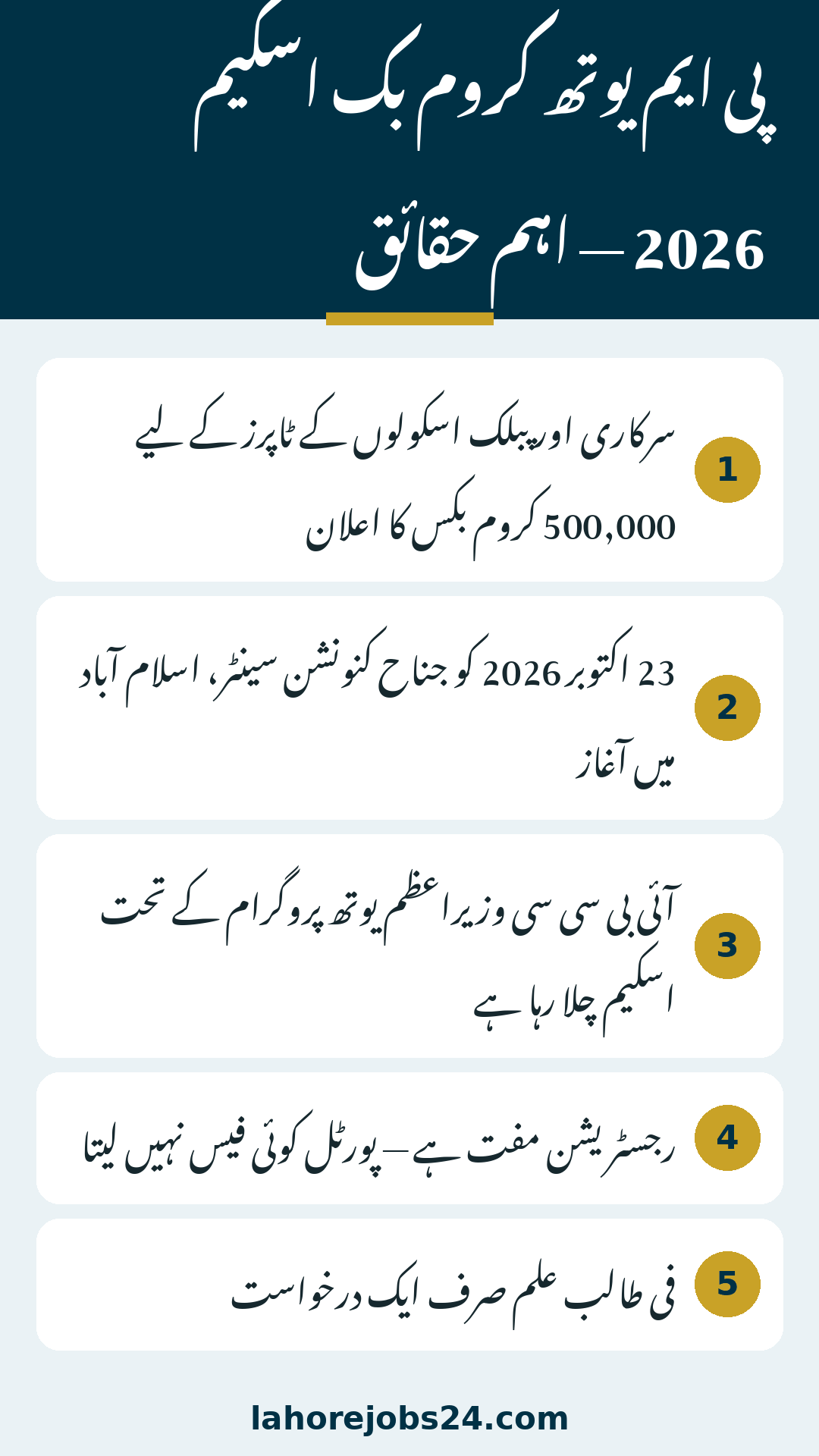
Thousands of government-school toppers across Pakistan are asking the same practical question this week: how do I actually submit my application for a free Chromebook under the Prime Minister’s Youth Programme? The scheme was formally launched on 23 October 2026 at the Jinnah Convention Centre in Islamabad, with 500,000 Chromebooks announced for high-achieving students of government and public schools, each Chromebook coming with a high-speed internet device. This guide walks you through the complete application process exactly as it works on the official IBCC portal, so you can apply correctly the first time. All details below follow the official portal of the Inter Boards Coordination Commission (IBCC).
Scheme
Prime Minister’s Youth Chromebook Scheme 2026
Run by
Inter Boards Coordination Commission (IBCC), under the Prime Minister’s Youth Programme
23 October 2026, Jinnah Convention Centre, Islamabad
Devices announced
500,000 Chromebooks for government/public-school toppers
Registration fee
None — the portal charges nothing
Applications per student
One application only
Nationwide closing date
No single date published on the portal — board deadlines differ (see deadline section below)
1. Check Your Eligibility Before You Apply
Before you open the portal, make sure you actually qualify. The scheme does not accept open applications from every student. Your education board sends a shortlist of qualifying students to IBCC, and only students on a board-sent list can proceed. If your name is not on your board’s list, the portal will simply not find your record, no matter how good your marks are.
School type: You must be a student of a government or public school. Private-school students are not eligible under the published rules.
Four provinces: In Punjab, Sindh, Khyber Pakhtunkhwa and Balochistan, the scheme covers top-performing Grade 9 (SSC-I) students of the Annual Examinations 2026.
Islamabad, AJK and Gilgit-Baltistan: In the Islamabad Capital Territory, Azad Jammu and Kashmir and Gilgit-Baltistan, top students of both Grade 9 (SSC-I) and Grade 10 (SSC-II) are covered.
Merit basis: Selection is based on your 2026 annual examination result. Your board decides who makes its shortlist.
Minimum 50% marks: Students need at least 50 percent marks in the examinations to be considered, as announced at the launch ceremony.
Ranking and quotas: Students are ranked on SSC-I results verified by IBCC, and selection is made separately within each province or region, education board and group until the prescribed quota is fulfilled.
Seminary students included: Students of registered religious seminaries are also included, with their scrutiny done separately through the Directorate General of Religious Education. Within each province or region, four out of five devices go to school students and one to seminary students.
One application: Each student may submit only one application. Do not try to apply twice with different numbers, as duplicate entries can create problems.
The 500,000 devices are divided by province and region as announced at the launch ceremony:
Province / Region
Chromebooks
Punjab
181,090
Sindh
85,925
Khyber Pakhtunkhwa
51,170
Balochistan
31,815
Islamabad
100,000
Azad Jammu & Kashmir
25,000
Gilgit-Baltistan
25,000
Total
500,000
A simple rule of thumb: if you are a government-school student who performed at the top of your class in the 2026 annual exams, check the portal. If you study in a private school, this scheme does not cover you, and no agent or shop can change that.
2. Documents Required for Chromebook Application
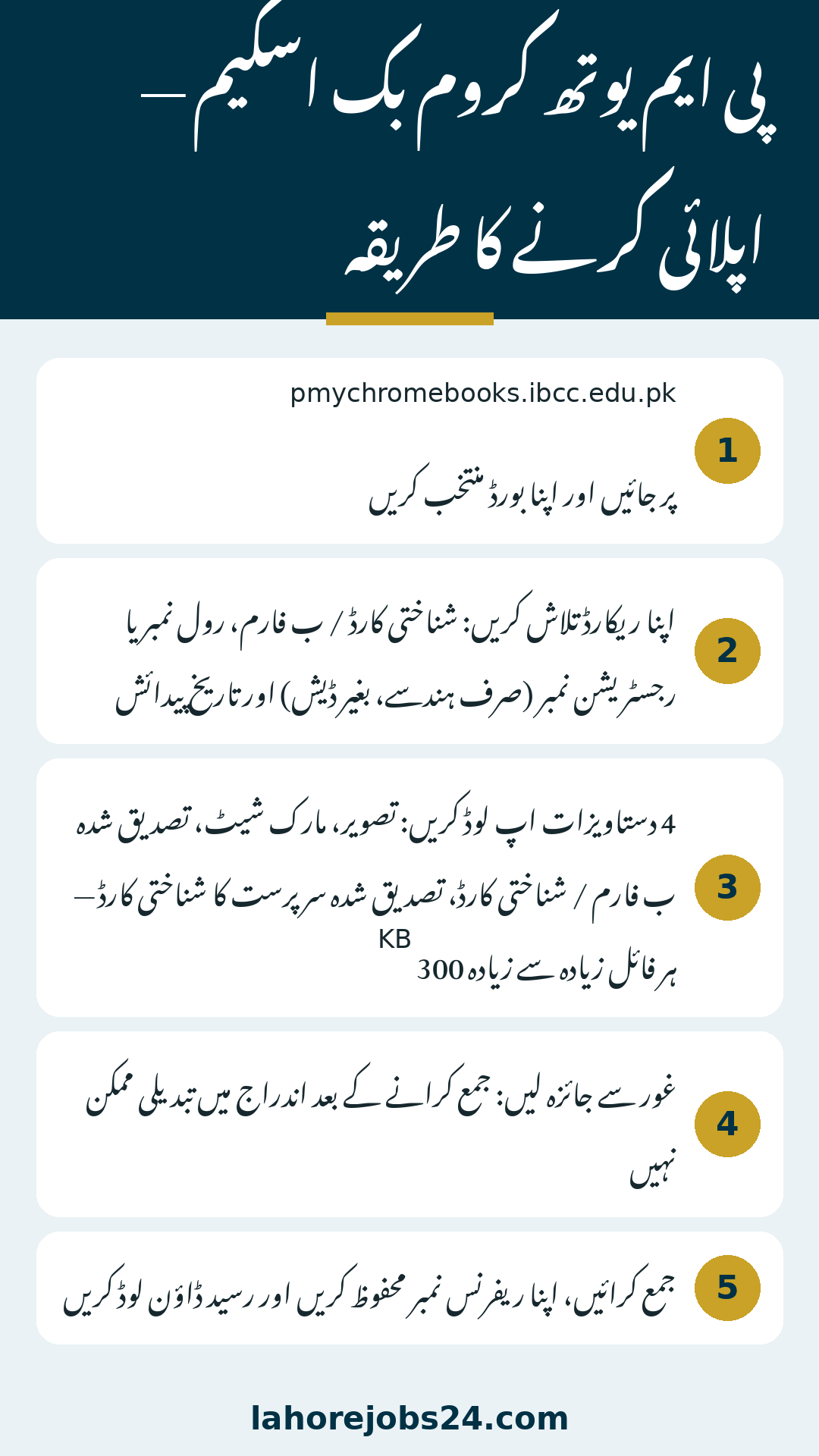
Prepare your documents before you start the form. The portal accepts four items, and every file must be 300 KB or smaller and clearly readable. A blurry scan or an oversized file is one of the most common reasons applications get stuck, so take a few minutes to get this part right.
Recent colour photograph: A front-facing photo with a plain background, in JPG or PNG format. Use a fresh photo, not an old or cropped group picture.
Mark sheet: Your SSC-I (9th class) or SSC-II (10th class) mark sheet, in JPG, PNG or PDF format.
Student identity document: An attested copy of your B-Form or CNIC, in JPG, PNG or PDF format.
Guardian identity document: An attested copy of your father’s or guardian’s CNIC, in JPG, PNG or PDF format.
Keep each file under 300 KB. If a scan is too large, reduce its size with any free image compressor or phone app, but check afterwards that the text is still easy to read. Get the attestation done in advance, because an unattested copy may not be accepted. Save all four files in one folder on your phone or computer so you can upload them without hunting for them halfway through the form.
3. How to Apply Online Step by Step
The application itself is short, but every step matters because entries cannot be edited after submission. Follow the steps in order, and do not rush the review stage.
Open the portal and select your board. Go to pmychromebooks.ibcc.edu.pk and choose your education board from the list.
Find your record. Enter your CNIC or B-Form number, or your roll number, or your registration number — digits only, with no dashes — together with your date of birth, then click Find My Record.
Verify your displayed details. The portal will show your name, school and marks as received from your board. Read them carefully and make sure they match your own record.
Upload your documents. Upload the photograph, mark sheet, attested B-Form or CNIC copy, and attested guardian CNIC copy, each within the 300 KB limit.
Review everything. Go through the full form once more. Remember that entries cannot be changed after you submit, so a wrong number or a wrong document here is very hard to fix later.
Submit and save your slip. Submit the form, note down your reference number, and download the acknowledgement slip. Keep both safe — you will need them for any follow-up with your board.
If possible, apply from a stable internet connection and a device where your documents are already saved. A dropped connection in the middle of an upload can force you to start again, and re-entering details increases the chance of a typing mistake.
4. Deadline Status: What Students Must Know Now
This is the part where students need honest information, not rumours. The official portal displays no single nationwide closing date for the scheme. That means there is no one last date that applies to every student in Pakistan, and any message claiming a fixed national deadline should be treated with caution.
Board deadlines have differed. Notices from BISE Lahore, the AJK board and BISE Multan asked students to register by 19 October 2026. That date has already passed, and checks up to 25 October 2026 found no extension notice. Sindh students should note a special portal notice: their registration opens on the same portal after all Sindh education boards announce the 2026 annual ninth-grade results. Other boards may have followed different schedules, so your own board’s position is what matters for you.
Before assuming the window is open or closed, do two things: check your own board’s official website for its latest notice, and check your record on the portal itself. If the portal still accepts your record, follow the steps above promptly rather than waiting. Distribution dates and merit cut-offs have not been officially announced yet, so do not trust any list or date circulating on social media that claims otherwise.
Seeing “record not found” does not automatically mean you are ineligible. It usually means the portal cannot match what you typed with the list your board sent. Work through these fixes in order before giving up.
Try a different identifier. If you searched with your CNIC or B-Form number, try your roll number instead, or your registration number. Enter digits only, with no dashes.
Check your date of birth. A single wrong digit in the date of birth can block the match, so re-enter it exactly as it appears on your B-Form.
Confirm your board selection. Make sure you selected the correct board. Students sometimes pick a neighbouring board by mistake.
Contact your education board. If none of the above works, your board is the correct authority to contact. The portal only searches the lists the boards sent, so only your board can confirm whether your name was included or correct an error in its list.
The IBCC scheme portal page publishes no phone helpline, so there is no official helpline number to call for this scheme, and students should not trust numbers shared in forwarded messages. The help route is your own education board. For Punjab students, the nine board websites are biselahore.com, web.bisemultan.edu.pk, bisegrw.edu.pk, bisefsd.edu.pk, biserawalpindi.edu.pk, bisesargodha.edu.pk, bisebwp.edu.pk, bisedgkhan.edu.pk and bisesahiwal.edu.pk. Visit your own board’s site for its notices and contact details.
6. Avoiding Frauds and Common Mistakes
Every popular government scheme attracts fraud, and this one is no different. A few habits will keep your application and your money safe.
Never pay anyone. There is no registration fee on the portal. Anyone demanding money for a Chromebook application, a form, or a “guaranteed” selection is not official.
Use only the official portal. Apply only through the IBCC portal named in this guide. Do not hand your CNIC number, B-Form number or documents to agents, shops or social media pages offering to apply on your behalf.
Do not trust WhatsApp forwards. Messages claiming a new deadline, a quota list or a distribution date are not official unless your board or IBCC publishes them.
Review before submitting. Because entries cannot be edited after submission, a wrong CNIC digit or a wrong uploaded file can cost you the whole application.
Keep your slip and reference number. Without them, following up with your board becomes much harder.
Parents can help by sitting with the student during the application, checking the documents once before upload, and keeping a copy of the downloaded slip at home.
Application checkpoint
What to confirm
Eligibility
Government/public school; Grade 9 in provinces, Grade 9 or 10 in Islamabad, AJK and GB; on your board’s shortlist
Documents ready
Photo, mark sheet, attested B-Form/CNIC, attested guardian CNIC — each file 300 KB or less
Record search
CNIC/B-Form, roll number or registration number (digits only, no dashes) plus date of birth
Before submitting
Name, school and marks match the board record; all uploads readable; no editing possible afterwards
After submitting
Reference number saved and acknowledgement slip downloaded
Quota & selection
Minimum 50% marks; ranking on SSC-I results verified by IBCC; selection per province/region, board and group until the quota is met
If stuck
Contact your own education board — the portal has no published phone helpline
Conclusion
Applying for the PM Youth Chromebook Scheme 2026 is a short process, but it rewards preparation: confirm that you are on your board’s shortlist, get your four documents attested and sized under 300 KB each, enter your numbers without dashes, and review the form carefully before you submit, because no edits are possible afterwards. Check your own board’s latest notice about deadlines rather than trusting forwarded dates, and remember that registration is completely free. Distribution dates and merit cut-offs are still to be announced officially, so keep your reference number and slip safe and watch your board’s website for the next update.
How do I apply for the PM Youth Chromebook Scheme 2026 online?
Open the official IBCC portal, select your board, find your record using your CNIC/B-Form, roll number or registration number plus your date of birth, upload your documents, review the form carefully and submit. Save your reference number and download the slip.
Who is eligible for the free Chromebook?
Top-performing students of government or public schools, based on the Annual Examinations 2026. In the four provinces it is Grade 9 students; in Islamabad, AJK and Gilgit-Baltistan it is Grade 9 and Grade 10 students. Private-school students are not eligible, and only students on a board-sent list can proceed.
What documents are needed?
A recent front-facing colour photograph on a plain background, your SSC-I or SSC-II mark sheet, an attested copy of your B-Form or CNIC, and an attested copy of your father’s or guardian’s CNIC. Each file must be 300 KB or smaller and clearly readable.
Is there any fee for applying?
No. The portal charges no registration fee. Anyone asking for money in connection with this scheme is not official.
What is the last date to apply?
The official portal publishes no single nationwide closing date. BISE Lahore, the AJK board and BISE Multan had set 19 October 2026, which has already passed, but board schedules differ, so check your own board’s website and your portal record.
What should I do if my record is not found?
Try your roll number or registration number instead of your CNIC/B-Form number, check your date of birth and board selection, and if it still fails, contact your education board. The portal only searches board-sent lists.
Is there a helpline number for the Chromebook scheme?
No phone helpline is published on the IBCC scheme portal page. The correct help route is your own education board.
Can I edit my application after submitting it?
No. Entries cannot be edited after submission, which is why the review step before submitting is so important.
How many Chromebooks will each province get?
Of the 500,000 Chromebooks, Punjab gets 181,090, Sindh 85,925, Khyber Pakhtunkhwa 51,170 and Balochistan 31,815. Islamabad gets 100,000, while Azad Jammu & Kashmir and Gilgit-Baltistan get 25,000 each.
Is an internet device included with the Chromebook?
Yes. Each Chromebook comes with a high-speed internet device. According to the launch announcement, one connection can benefit up to five people, giving digital access to around 2.5 million people in total.
When will the Chromebooks be distributed?
Distribution dates and merit cut-offs have not been officially announced yet. Watch your board’s official website for updates.
Shahzad Sahil is the editor of lahorejobs24.com, covering government jobs, private jobs, bank jobs, results and education news for Lahore and Punjab, with information verified from official sources.





7 thoughts on “PM Youth Chromebook Scheme Apply Guide 2026: How to Apply Online”